
SMS Character Limits: Why One Reminder Becomes Two Segments
An appointment reminder can look almost identical in two drafts and still take a different path through the SMS system. The difference might be a single…
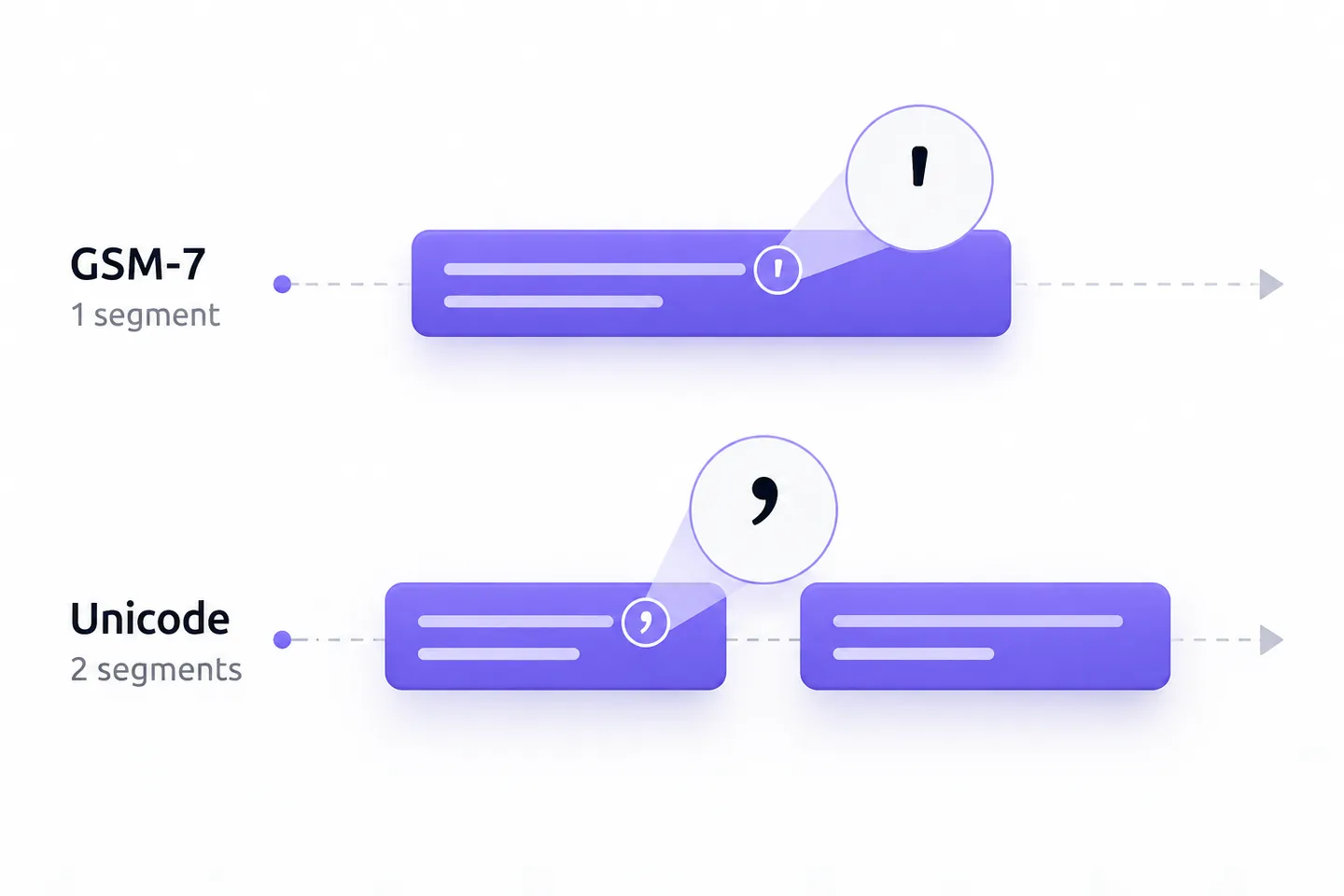
An appointment reminder can look almost identical in two drafts and still take a different path through the SMS system. The difference might be a single apostrophe. Change the straight mark in can't to the curly mark in can’t, and a message that fits in one segment may need two. The visible character count has not changed; the encoding has.
That is the practical problem behind the search for an SMS character limit for Unicode. A word processor counts what a person sees. An SMS segment counter checks which characters the network must carry and how much space remains for the message. For anyone writing reminders, confirmations or service updates, the useful question before sending is therefore: How many segments will this exact final text use?
The Same Reminder, Counted Two Ways
Consider two versions of an illustrative appointment reminder:
- Straight apostrophe: Reminder: Your appointment is Tuesday at 2:30 pm. If you can't attend, check your booking confirmation. At 103 visible characters, it uses GSM-7 and fits in one segment.
- Curly apostrophe: Reminder: Your appointment is Tuesday at 2:30 pm. If you can’t attend, check your booking confirmation. It has the same visible length but uses the Unicode fallback and needs two segments.
The only edit is the apostrophe in can't. The first version uses the straight apostrophe available in GSM-7. The second uses a curly apostrophe outside that character set, so the entire SMS is treated under the shorter Unicode limit. Twilio’s SMS character-limit guide gives the same kind of smart-quote example: changing a straight quotation mark to a curly one can change the encoding of the whole message.
At 103 GSM-7 characters, the first draft is below the 160-character single-segment limit. At 103 characters under the commonly described UCS-2 limit, the second is above the 70-character single-segment limit. A multipart Unicode message has room for 67 characters per segment under the standard calculation, so 103 requires two. The text need not appear as two separate bubbles on a recipient’s phone. It is still transmitted as two SMS segments that the receiving route attempts to put back together.
What 160/153 and 70/67 Mean
A single SMS segment has a limited payload. In the usual GSM-7 case, it can hold up to 160 units from that character set. If the message becomes multipart, each segment holds up to 153 because some space is used for information that helps identify and join the parts. With the Unicode fallback commonly called UCS-2 in SMS guidance, the corresponding limits are 70 for one segment and 67 per segment in a multipart message. These are the standard figures in Twilio’s SMS limit table.
The smaller multipart allowance matters at the boundary. A 160-character GSM-7 message can fit in one segment, but a 161-character message needs two segments with the multipart allowance applied to both parts. Likewise, 70 characters in the Unicode case can fit in one segment; 71 require two segments calculated against the 67-character allowance. It is a step change, not a gradual reduction in spare space after the first segment fills.
“Character” is also a useful shorthand rather than a perfect counting rule. The 3GPP alphabet specification published by ETSI defines a GSM-7 extension table. A symbol from that table uses an escape sequence as well as the symbol’s code, so it can take two GSM-7 units while displaying as one character. Emoji and some other Unicode characters can complicate a simple visual count too. A reliable counter examines the exact encoded message instead of assuming that every visible symbol consumes one unit.
The route also matters. Twilio documents a different multipart allowance for certain toll-free SMS sent to the United States or Canada: 152 GSM-7 or 66 Unicode characters per segment. Treat a hand calculation as a preview and check the counter used for the actual send.
What Changes When the Message Is Split?
For a multipart SMS, the sending system transmits several segments with information intended to let the receiving side reconstruct one message. That reconstruction is not a universal promise. Twilio’s Messages API documentation says it annotates long messages to attempt reassembly on the recipient’s handset and notes that not all carriers and handsets support it. Its documentation makes the same qualification for long incoming messages.
The sensible writing assumption is that a split message introduces another dependency between the sender and a readable result. A segment count tells you how many pieces the system expects to send; it does not prove how the final message will be displayed on every device. If the reminder’s essential instruction is buried at the end of a long multipart text, the reader may have a less dependable experience when reassembly or delivery is imperfect. Put the appointment fact and the needed next step early, and test important templates on the sending route you intend to use.
Segment count also affects cost. Twilio’s SMS foundations guide lists the price of each message segment as one cost component. Under that model, the two-segment version of the reminder is counted differently from the one-segment version. The amount depends on the service and route.
A Copy Edit That Keeps the Meaning
Suppose the second draft came from a document editor that automatically changed straight apostrophes to typographic ones. The natural copy edit is small: change can’t back to can't, then run the complete message through a segment counter again. The reminder still tells the recipient when the appointment is and where to look if they cannot attend. Its intended meaning has not been shortened away merely to fit a technical limit.
That distinction is important. Deleting “check your booking confirmation” would also make the message shorter, but it would remove the next step. For an appointment reminder, a clear next step may matter more than saving a segment. The right edit depends on the message’s purpose: replace an accidental curly mark when it is safe to do so; keep a necessary character or instruction when removing it would make the message harder to understand.
Nor should every Unicode character be treated as an error. Names, languages and accessible wording may require characters outside GSM-7. If a person’s name or a useful instruction needs them, preserve the text and plan for the resulting segment count. A counter is a planning tool, not a reason to flatten meaningful copy into an awkward imitation.
Finally, check the version that will actually be sent. A template may be short in a draft but grow after a name, date, location or approved link is inserted. If those fields vary by recipient, test representative long values as well as the empty template. An added sentence can cross a multipart boundary; an inserted Unicode character can change the encoding of the whole message. Both changes may alter segment count even when the template itself was previously approved.
A Pre-Send Check for Reminder Copy
- Read the final message as a recipient. Confirm that the appointment detail is clear and that every suggested action matches a real, available process. Do not promise replies, links or changes that the business cannot handle.
- Inspect pasted punctuation and symbols. Look for curly quotes, curly apostrophes, unusual spaces, emoji and characters introduced by document editors or copied text. Decide whether each one is intentional.
- Run the exact text through an SMS segment counter. Check the reported encoding, encoded length and segment count. Use a counter that reflects the service that will send the message.
- Test the assembled template. Include realistic values for every variable field. Repeat the count for long names or other fields likely to push the message over a boundary.
- Review the result after the send when available. A provider’s actual segment field can help reconcile the estimate with the processed message. In Twilio’s API, num_segments is the SMS segment count, although it may initially be zero for a message sent through a Messaging Service before a sender is assigned. Check the later message record.